Wednesday, 28 November 2012

NOTE: Metadata-Bound Libraries

Since the introduction of metadata-defined LIBNAMEs in the earliest days of version 9, it's been a frustration that the security that can be applied within SAS metadata to control who can access libraries can be completely undermined by users simply hand-coding an equivalent LIBNAME statement with a specific path to the data and thereby bypassing the SAS metadata security layer. It seems that V9.3 M2 introduced a solution to this, but it competely slipped under my radar - until now (my thanks to BS for alerting me to this).

The new SAS 9.3 Guide to Metadata-Bound Libraries tells us how data sets and views within metadata-bound libraries can only be accessed via the metadata-defined LIBNAME. The data sets are created with a special flag in their internal metadata which specifies their nature. Thus, access from SAS to data within a metadata-bound library is provided only if all of the following conditions are met:
  • The requesting user can connect to the metadata server in which the corresponding object is stored
  • The requesting user’s metadata identity has all required metadata-layer effective permissions for the requested action
  • The host identity with which the data is retrieved has all required host-layer access to the data.
In my view, this is a very significnt enhancement to the security of SAS data. SAS metadata has long provided powerful and flexible capabilities for protecting your data, but it has always been possible to completely bypass it and leave the OS-level security as the gatekeeper. Applying passwords to data has never been a great solution because of the weak encryption and the need to hard-code the passwords in SAS code.

The security provided by metadata-bound libraries is strong, even surviving when the physical table is recreated or replaced. The cornerstone of this approach is the fact that the physical table contains the flag to specify it's a metadata-bound table, so all elements of SAS are available to respect the need to check the access permissions via metadata.

Inevitably, it's not a panacea. For instance, you can only bind BASE SAS data sets and views, and you cannot bind concatenated libraries; and though the binding prevents unauthorised access from SAS, it does not prevent non-SAS access to the data (non-SAS access is limited only by the OS-level security), so it is still possible to delete or rename tables without authorisation via SAS metadata.

All of this is made possible by the new PROC AUTHLIB (there's no GUI interface for creating metadata-bound libraries yet). AUTHLIB's CREATE statement allows you to create the binding.

This is a hugely significant step forward for SAS security, and a major benefit to be derived for anybody considering an upgrade from any version of SAS prior to V9.3 M". And do note: It's the second maintenance release of V9.3; metadata-bound libraries are not available in earleir versions of V9.3.

NOTE: ODBC Performance

SAS is great at getting data from a huge variety of sources. With its SAS/ACCESS connectors, SAS can get data from these sources in an optimised fashion, i.e. using the native capabilities of the source data provider. In these days of increasingly large set of data, optimisation and efficiency are crucial factors. Steve Overton wrote an article in the Business Intelligence Notes blog earleir this month in which he offered some experience and advice with regard to gatrhering data into SAS via ODBC.

ODBC is a generic means of accessing a large variety of different data sources. As such, it's less easy to optimise the process, but nonetheless we want the data to flow at the best possible rate. In SAS Administration: Fetch Big Data Faster Across ODBC, Steve describes how judicious use of the FETCH and USEDECLAREFETCH parameters in the ODBC.INI file can make big differences to the speed of your data access. Valuable.

Monday, 26 November 2012

NOTE: Documenting Your SAS Environment

If you're a new starter, or somebody just gave you extra SAS administration responsibilities, you may be struggling to find your way around the new SAS environment. Brian Varney presented an insightful paper at this year's South East SAS Users Group (SESUG) entitled Getting to Know an Undocumented SAS Environment. Brian's insights will be of use to those pitched into the situations I described above.

Brian structured his paper into what, where, and who. In each section, Brian presented brief tips and techniques for discovering details about the SAS environment.

How do I know Brian presented this paper? Did I visit Durham in North Carolina and attend SESUG? Sadly, no. But I do subscribe to SAS's SAS Users Groups blog. It reduces the jet lag! Christina Harvey's How to Document Your SAS Environment article alerted me to Brian's paper. If you're in need of a better understanding of your SAS environment, I recommend you check it out.

AND, it's clearly a popular topic because David Chapman was talking on the same topic at NESUG (NorthEast SAS Users Group). In Determining What SAS Version and Components Are Available (MA01) (highlighted on the SAS Users Blog, again), David discussed a macro that he had written to display salient information. I was most interested to follow his reference to SAS Knowledge Base article KB20390 which offers some very neat code (with very neat output, more to the point) for displaying what server software you're licensed for, what you have installed, version numbers and a bunch of other stuff.

NOTE: Getting Social With SAS Metadata

I noticed a most intriguing post on Paul Homes's Platform Admin blog recently. Do you and your colleagues discuss your metadata often? Paul thinks you should, and I'm inclined to agree.

This isn't a new or unique idea. SAS were talking about a collaboration framework at this year's SAS Global Forum, and I wrote a brief post about it. The idea of having a platform to facilitate business-like discussions that are focused upon specific business objects such as web reports, information maps, tables, stored processes and cubes seems to hold value.

You'll recall that Paul runs Metacoda Pty Ltd, providers of SAS services plus the excellent Metacoda Security Plug-Ins for viewing your SAS security metadata and rules. Well, Metacoda are now in the final stages of development of a new product to facilitate discovery and discussion of your metadata.

Fundamentally, the Metacoda product (which doesn't seem to have a name yet) will provide:
  • Activity: get notified about any changes and discussions on items of interest to you
  • Search: find the items you want and register your interest in seeing activity for them
  • Discussions: share your knowledge and learn from the knowledge and experience of others
  • Easy Access: get easy access from anywhere: browsers on desktop PC’s, tablets, or smart phones, and even custom applications, add-ons, and plug-ins
  • Performance: to make it as fast as we can, so you can find what you need, when you want it, and don’t miss out on shared knowledge because it takes too long or it’s too hard to find
  • Security: only provide access to metadata you normally have access to
I think the idea has great merit. Metadata is not just a technical thing; it represents the objects that are important to our business. Paul is seeking collaboration with enterprises who might be able to make immediate use of Metacoda's new tool. If your interest is piqued, get in touch with Paul via the link at the bottom of his post.

Wednesday, 21 November 2012

NOTE: Now I see Visual Analytics

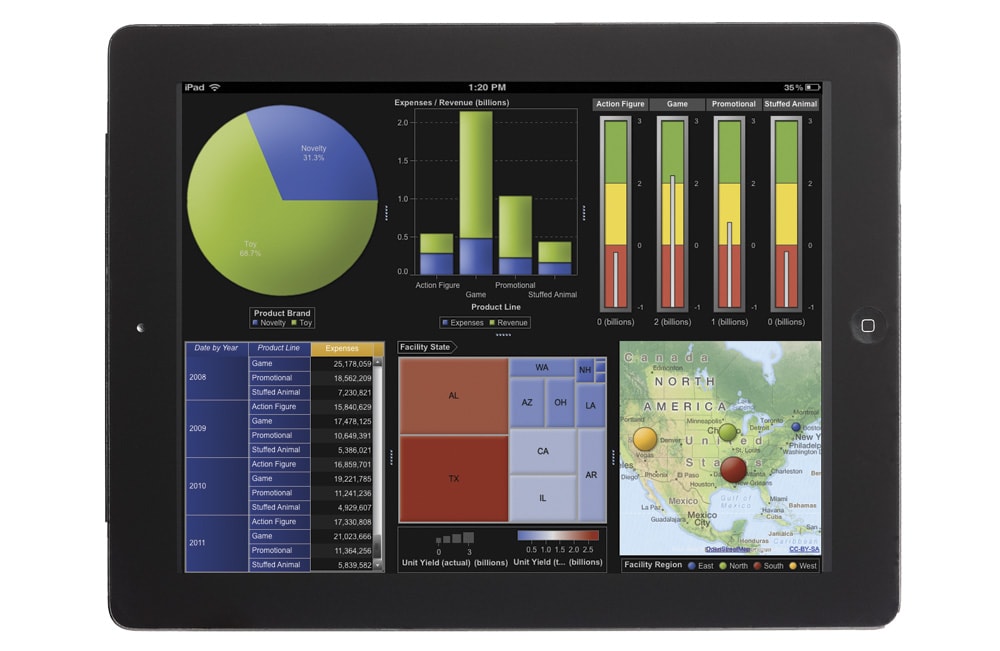
I'll confess that whilst there was a lot said about SAS Visual Analytics at this year's SAS Global Forum, I came home with some confusion over its architecture, functionality and benefits. I was fortunate to spend some quality time with the software recently and I think I've now got a good handle on it. And it's impressive.

It's comparatively early days in its life cycle; it provides value for a significant set of customers, but it will benefit an ever larger population as it evolves and gets enhanced over time.

The key benefits as I see them are i) its handling of "big data", ii) its user friendly yet highly functional user interface, and iii) its ability to design a report once yet deliver the report through a variety of channels (including desktop, web and mobile).

The big data element is delivered through in-memory techniques that are incorporated in the SAS LASR Analytic Server. In essence, this means that you need to reserve a number of servers (on commodity "blade" hardware or on database appliances from EMC Greenplum and Teradata) for the purpose of providing the in-memory capabilities. Once the data is loaded onto the LASR server and copied into memory, users can explore all data, execute analytic correlations on billions of rows of data in just minutes or seconds, and visually present results. This helps quickly identify patterns, trends and relationships in data that were not evident before. There's no need to analyse sub-sets of your data and hope that they are representative of the full set of data.

The user-friendly interface is largely drag-and-drop in a similar style to the design of Excel pivot tables. There is a wide range of output styles such as tables, graphs, & charts, and these can be laid-out into a report and linked together for synchronised filtering, drilling, slicing and dicing. The current release incorporates regression analysis and correlations. I anticipate that future releases will soon after more functionality such as forecasting.

The reports that you design in Visual Analytics are simultaneously available through a number of channels including web, and  mobile on iPad & Android. This means that your dashboards and reports are available to anybody, anywhere (combined with SAS security measures that make sure nobody sees any information that they are not meant to).

All-in-all, SAS Visual Analytics is another step in taking away the friction caused by technology limitations and allowing analysts to execute their analytical processes more effectively and efficiently. Less programming, more analysis, better results.

Monday, 19 November 2012

NOTE: Clean Your Cubes

It's not spring-time, but it's still worth giving a thought to the cleanliness of your environment, for the benefit of reducing complexity and of reducing space usage. Angela Hall posted a great article about Cleaner OLAP Cube Physical Folder Structures earlier this month on SAS's Real BI for Real Users blog.

In her article, Angela gave a "below the water line" view of OLAP cubes and how they are maintained and stored. Her tips for cube rationalisation will reduce disk space usage and improve performance. Well worth a look.