Feedburner tells us that we achieved the mini-milestone of 100 subscribers yesterday. I'd like to say a big thank you to all of you who have shown interest in the blog, especially those who have taken time to comment on our posts or email us with your thoughts.
For those interested in statistics and figures, our first post was on 22nd July this year; we have made a total of 33 posts (34 if you include this one); Sitemeter tells us that we've had a total of 635 visits to the home page (127 of which were last week alone).
Please keep visiting and keep commenting. And don't forget to encourage your colleagues to take a look and subscribe too.
Thursday, 15 October 2009
Wednesday, 14 October 2009
Visual Dictionary: VisuWords
I just discovered VisuWords, an online graphical dictionary. I'm loving it (but I'm easily swayed by graphical interfaces!).
It not only shows the meaning of words but it also shows relationships between words. And it looks fun too (did I mention that?!)
Have a look and give it a try. Unlike the more sophisticated-looking Visual Thesaurus, it's free. Do you know of any others like it? Write a comment and let us all know...
It not only shows the meaning of words but it also shows relationships between words. And it looks fun too (did I mention that?!)
Have a look and give it a try. Unlike the more sophisticated-looking Visual Thesaurus, it's free. Do you know of any others like it? Write a comment and let us all know...


Round the World Update: Race 2, Day 21
We're following the progress of SAS consultant Andy Phillips as he competes aboard yacht Team Finland in the Clipper 09-10 Round The World yacht race for amateur sailors. Andy's yacht won the first race (from England to France) but times are tougher in race 2: France to Brazil. It's a much longer course, and there are hurdles along the way, such as the infamous Doldrums.
Despite the hurdles, Team Finland is leading race 2, by some distance. You can see the boats' positions in the Viewer on the home page. The Doldrums have had a marked effect on the race with half of the field having navigated through or round them and now motoring towards Rio in Brazil, and with the other half becalmed or, in the case of the unfortunate California, not having yet reached them.
In keeping with the spirit of the event, Team Finland's crew are thinking of their fellow competitors and have offered to great California with mops and buckets in order to do California's deep clean whilst her crew take a well deserved rest (or a few beers).
Team Finland may be leading but it hasn't been an uneventful trip. Andy wrote in his diary a couple of weeks back:
Despite the hurdles, Team Finland is leading race 2, by some distance. You can see the boats' positions in the Viewer on the home page. The Doldrums have had a marked effect on the race with half of the field having navigated through or round them and now motoring towards Rio in Brazil, and with the other half becalmed or, in the case of the unfortunate California, not having yet reached them.
In keeping with the spirit of the event, Team Finland's crew are thinking of their fellow competitors and have offered to great California with mops and buckets in order to do California's deep clean whilst her crew take a well deserved rest (or a few beers).
Team Finland may be leading but it hasn't been an uneventful trip. Andy wrote in his diary a couple of weeks back:
Picture the scene; it's around 8pm on a balmy Monday night somewhere off the coast of the Canaries.Good luck with the remainder of race 2, Andy. We're cheering for you...
The sun has set and there is only moonlight to guide the way. Life on deck is subdued with only the greetings of a watch change to break the steady purring of the boat powering on.
From nowhere something leaps from the water, a shriek is then sharply followed by a cry of, "Something strange just touched my bottom!"
This was the scene last night on Team Finland that could have cost us valuable miles. Much to Eve's horror - and our amusement - she had been accosted by a randy squid! We're not sure how or why but this little sea creature leapt 2 metres into the air with unerring precision and smacked her square on the backside! She then proceeded to run away squealing, prompting even more laughter. Helming when you can't see for tears certainly makes things more interesting. Once the squid had been given a stern talking to it was later released back to the ocean.
The only low point of the day was one of our crew getting burnt by some hot water. We've two doctors on board so she was immediately taken care of and I'm glad to say is on the road to making a full recovery. Everyone else is fine and has just enjoyed a glorious sunrise over Fuerteventura. We're pushing the boat a wee bit harder to see if we can make any gains on our rivals so hopefully that Finnish flag on the race viewer will begin sneaking up further forward.
Hi to everyone back home missing you all lots.
Andy Phillips
NOTE: PROC GKPI Does Dashboards
SAS has long been renowned for the flexibility and power of its graphics, but if we're honest it has never produced top quality, visually-rich, presentation graphics out of the box. V9.2's PROC GKPI changes that, big time! GKPI produces some great looking bullet graphs, traffic lights, dials, and slider bars. Can we throw away our knowledge of annotate and DSGI? Read on...
![]()
Available in 2D or 3D, it's very easy to create any of these dashboard elements. In fact, the PROC has very few parameters, so you can't go wrong! The following code will create the dial shown alongside here.
You can see how the value and the ranges are hard-coded in the example, but they could easily be data-driven through the use of macro variables (optionally, within a macro).
![]()
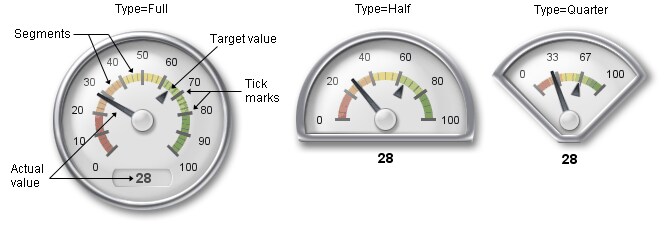
You can see three styles of speedometer alongside this text. The overview section of the documentation for PROC GKPI shows examples of each type of dashboard element.
Individual dashboard elements are very nice, but a dashboard is not a dashboard unless it has a collection of elements on it in order to provide the anticipated overview and scope. So, it's important that we can combine the individual elemnets produced from GKPI into a whole dashboard.
PROC GKPI only works with DEV=JAVAIMG. We can use it to produce such as PNG files and then include them in HTML web pages. However, the fact that JAVAIMG is the only device means that GKPI does not write a GRSEG entry to a catalog; so you can't produce a bunch of dashboard items and then use PROC GREPLAY to combine them into a single image. The trick is to use annotate and PROC GSLIDE to include the image(s) into a slide, and then use PROC GREPLAY...... ANNOTATE LIVES!
Enterprise Guide 4.2 does not offer a nice visual interface to GKPI, but I'm assured that 4.3 will do so. However, as you've seen, it's pretty simple to set the right parameters and get some great graphics.
If you're one of those who believes that content and information are more important than presentation you may scoff at GKPI. However, SAS's customers have been asking for this functionality for some time, so you can't blame SAS for giving their customers what they want.
![]()
So, if you thought GKPI only stood for Gomberg Kite Productions International, home of the world's biggest kites, you now know better!
Finally, some general references...
SAS's Robert Allison offers a large variety of SAS dashboard examples (with code) on his personal web site. Note, in particular, his GKPI dashboard and the associated code that shows GKPI used with annotate.
If you're into dashboarding, you should take a look at Dashboards By Example for some great examples of clear, vivid dashboards (and some really bad ones too!). The apparently dormant Dashboard Spy was a favourite of mine too.
Stephen Few is a highly respected practitioner in the area of data visualisation. Take a look at his company web site. His blog is highly recommended (though the photo of him is somewhat questionable!).
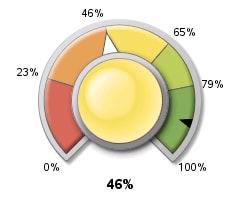
goptions reset=all device=javaimg xpixels=240 ypixels=200;
ods listing close;
ods html style=listing;
proc gkpi mode=raised;
dial actual=.46 bounds=(0 .23 .46 .65 .79 1) /
target=.9 nolowbound format="percent8.0"
afont=(f="Albany AMT" height=.5cm)
bfont=(f="Albany AMT" height=.4cm) ;
run;
quit;
ods html close;
You can see how the value and the ranges are hard-coded in the example, but they could easily be data-driven through the use of macro variables (optionally, within a macro).
Individual dashboard elements are very nice, but a dashboard is not a dashboard unless it has a collection of elements on it in order to provide the anticipated overview and scope. So, it's important that we can combine the individual elemnets produced from GKPI into a whole dashboard.
PROC GKPI only works with DEV=JAVAIMG. We can use it to produce such as PNG files and then include them in HTML web pages. However, the fact that JAVAIMG is the only device means that GKPI does not write a GRSEG entry to a catalog; so you can't produce a bunch of dashboard items and then use PROC GREPLAY to combine them into a single image. The trick is to use annotate and PROC GSLIDE to include the image(s) into a slide, and then use PROC GREPLAY...... ANNOTATE LIVES!
Enterprise Guide 4.2 does not offer a nice visual interface to GKPI, but I'm assured that 4.3 will do so. However, as you've seen, it's pretty simple to set the right parameters and get some great graphics.
If you're one of those who believes that content and information are more important than presentation you may scoff at GKPI. However, SAS's customers have been asking for this functionality for some time, so you can't blame SAS for giving their customers what they want.

Finally, some general references...
SAS's Robert Allison offers a large variety of SAS dashboard examples (with code) on his personal web site. Note, in particular, his GKPI dashboard and the associated code that shows GKPI used with annotate.
If you're into dashboarding, you should take a look at Dashboards By Example for some great examples of clear, vivid dashboards (and some really bad ones too!). The apparently dormant Dashboard Spy was a favourite of mine too.
Stephen Few is a highly respected practitioner in the area of data visualisation. Take a look at his company web site. His blog is highly recommended (though the photo of him is somewhat questionable!).
Monday, 12 October 2009
Correction: Enterprise Guide Expiry
Well, the SAS world is an exciting and dynamic place, so I shouldn't be suprised to find that the information I posted this morning on the expiry of Enterprise Guide V4.1 has changed. As you'll see in that post's comments from Chris@SAS, the deadline has been extended.
So, you can sleep easy in your bed tonight.
[Thanks for the speedy comment Chris, much appreciated]
So, you can sleep easy in your bed tonight.
[Thanks for the speedy comment Chris, much appreciated]
NOTE: Enterprise Guide Expires 2010
CORRECTION: See comments from Chris@SAS
Enterprise Guide (EG) V4.1 only works with SAS V9.1; and EG V4.2 only works with SAS V9.2; and EG V4.1 will stop working in December 2010. So if you're currently on EG 4.1, you need to migrate to SAS V9.2 before December 2010. Let me explain...
SAS usage note #33359 states that SAS Enterprise Guide software has a built-in expiration date, which is generally five to six years after it has been released. The software expires on the following dates:
SAS Enterprise Guide 2.1: December 1, 2008
SAS Enterprise Guide 3.02: December 1, 2009
SAS Enterprise Guide 4.1: December 1, 2010
And SAS's Chris Hemedinger wrote in the SAS Dummy blog back in May 2008 that whilst you can use EG 4.1 with SAS 9.2 running on the same machine
The conclusion from all of this is that by December 2010 you must have migrated to SAS 9.2 and EG 4.2, else EG will stop working. And, when you do the migration, you have to migrate your version of EG on the same day as you migrate your SAS version.
I was surprised to discover the hard-wired expiry in EG. And when you combine it with the compatibility issues between EG versions and SAS versions, you get a situation that requires early planning for the SAS 9.1 to SAS 9.2 migration. You have been warned...
Enterprise Guide (EG) V4.1 only works with SAS V9.1; and EG V4.2 only works with SAS V9.2; and EG V4.1 will stop working in December 2010. So if you're currently on EG 4.1, you need to migrate to SAS V9.2 before December 2010. Let me explain...
SAS usage note #33359 states that SAS Enterprise Guide software has a built-in expiration date, which is generally five to six years after it has been released. The software expires on the following dates:
SAS Enterprise Guide 2.1: December 1, 2008
SAS Enterprise Guide 3.02: December 1, 2009
SAS Enterprise Guide 4.1: December 1, 2010
And SAS's Chris Hemedinger wrote in the SAS Dummy blog back in May 2008 that whilst you can use EG 4.1 with SAS 9.2 running on the same machine
- You cannot use SAS Enterprise Guide 4.1 to connect to SAS 9.2 running on another platform or remote machine.
- You will not be able to use SAS Enterprise Guide 4.1 to connect to SAS 9.2-based SAS Metadata Server
The conclusion from all of this is that by December 2010 you must have migrated to SAS 9.2 and EG 4.2, else EG will stop working. And, when you do the migration, you have to migrate your version of EG on the same day as you migrate your SAS version.
I was surprised to discover the hard-wired expiry in EG. And when you combine it with the compatibility issues between EG versions and SAS versions, you get a situation that requires early planning for the SAS 9.1 to SAS 9.2 migration. You have been warned...
Subscribe to:
Posts (Atom)